Interactivated Growth Lab:
Tech, Design & Business Insights
Explore our expert articles on scaling startups, product development, digital transformation, and cutting-edge technologies reshaping industries

Magento progressive web apps
Better yet, the number of features is constantly expanding to meet the ever-changing consumer needs and stay up-to-date with the market trends.
Progressive Web Apps are certainly one of the most powerful features at merchants’ disposal. Using them can have a myriad of positive effects on your e-commerce business, if you take full advantage of them.
What are progressive web apps?
By 2022, mobile commerce in the US is expected to account for around half of all online retail sales. This imposes a need on the merchants to ensure the best mobile shopping.
Many of them take to the belief that optimizing their website for smartphones is enough. Unfortunately, this isn’t the case. According to a research by The State of Retailing Online and partners, merchants can only expect an average conversion rate of 2.3% from mobile web.
But the conversion rate grows to 6% with native apps. This means that building an app for your e-commerce store is a far better solution than just ensuring that the site is mobile-friendly.
However, this solution suffers from a few drawbacks as well. The biggest of which is that not a lot of people are inclined to download a native app to make a purchase. A large number of your customers may be one-time purchasers, or at least they may think so at first, and downloading an app for that is just too bothersome.
So is there another solution?
Yes, and it’s in the form of Progressive Web Apps (PWAs). Essentially, these apps take the best of mobile web and native apps and create a blend of features that makes mobile shopping much more enjoyable. They combine the instant gratification and convenience of a mobile website with a rich set of features that native apps offer.
PWAs ensure a fast and frictionless mobile shopping experience, which is bound to yield a variety of amazing results.
Why should you use them?
By the end of 2018, merchants will get to explore the new Magento 2.3. Among a ton of features that can open many doors for business owners, PWA Studio is the most exciting. Here are some of the reasons why you’d want to take full advantage of it:
- Engagement and conversion rate boost
Take a look at Trivago as an example. After the company implemented PWAs into its website, it saw an increase in engagement of 150%. Moreover, the hotel offers click-outs got a 97% boost.
Of course, conversion is still the thing that matters the most. Turning people into buyers is what keeps your business afloat at the end of the day.
Magento promises that its PWA solution will be able to increase conversion by more than 50%. There’s definitely proof to support this claim, as the Grand Velas Riviera Maya increased its Black Friday conversions by 53% once the resort started using PWAs.
The ability to raise your engagement and conversion rates can take your business to another level. There’s a lot of evidence that PWAs can make this happen, so this alone is reason enough to give them a shot. Still, the benefits that you can gain extend far beyond just this.
- Lightning-fast browsing
PWAs ensure instant loading and incredible browsing speed. The result is a highly responsive user interface that can greatly enhance the users’ shopping experience. Moreover, it makes sure that pages won’t have to reload, since it precaches different parts of your web app. This means that if someone wants to access your web app multiple times, they’ll be able to do that without having to wait for the page to load every time.
- No network? No problem.
Every function of your PWA will continue to work so that your users enjoy an uninterrupted browsing experience. They can even place an order without a connection, which will be on stand-by until the PWA is back online.
- Instant access
Instead, an app-like icon will be right there on their home screen, which enables easy access. Better yet, full-screen mode is available as well, so the user can have a full app-like experience without having to actually download any apps.
The main benefit of this is an increase in engagement. This encourages repeated visits to your shops and makes it much easier for your customers to make purchases.
The final word
The buzz around PWAs started a couple of years ago, and now Magento is offering its users the chance to experience everything that these apps have to offer first-hand. If you’re in Early Adopter program, you might’ve already seen how powerful PWA Studio is.
If not, the official release of Magento 2.3 might be a turning point for your business. Once you get a taste of what PWAs can do for you, there’s a high chance you’ll wonder how your store could’ve survived without them.
What are service contracts in Magento 2?

If you’re unfamiliar with what service contracts are in general, they’re actually agreements between two parties, a service provider and a service consumer. The contract defines the services that the consumer will get, along with some additional information.
So how does this work with Magento?
Magento service contracts
Essentially, service contracts are just a set of interfaces and classes that protect data integrity and hide the business logic. The reason why customers will want to use this is that the contract allows the service to evolve without affecting its users.
The reason this upgrade is important is because it changes the way that users interact with different modules. In Magento 1, there were no good ways of interacting with other modules. With service contracts in Magento 2, you can access and manipulate data easily, without having to worry about the system’s structure.
Service contract architecture
The service layer has two different interface types: Data interfaces and Service interfaces. Data interfaces are objects that preserve data integrity by using the following patterns:
- They’re read-only, since they only define constants and getters.
- Getter functions can contain no parameters.
- A getter function can only return a simple object type (string, integer, Boolean), a simple type array, and another data interface.
- Mixed types can’t be returned by getter functions.
- Data entity builders are the only way to populate and modify data interfaces.
- Repository Interfaces
- Management Interfaces
- Metadata Interfaces
Repository interfaces
Repository interfaces ensure that a user can access persistent data entities. For example, persistent data entities within the Customer Module are Consumer, Address, and Group. This gives us three different interfaces:
- CustomerRepositoryInterface
- AddressRepositoryInterface
- GroupRepositoryInterface
- Save – If there’s no ID, creates a new record, and updates what’s existing if there is one.
- Get – Looks for the IDs in the database and returns a certain data entity interface.
- GetList – Finds all data entities that correspond with the search criteria, then gives access to the matches by returning the search result interface.
- Delete – Deletes the selected entity
- DeleteById – Deletes the entity when you only have its key.
Management interfaces
These interfaces contain different management functions that are unrelated to repositories. Here are some examples:
- AccountManagementInterface contains functions such as createAccount(), isEmailAvailable(), changePassword(), and activate().
- AddressManagementInterface checks whether an address is valid by using the validate() function.
Metadata interfaces
Metadata interfaces give information about all the attributes that are defined for a specific entity. This also includes custom attributes, which you can access with the getCustomAttribute($name) function. These custom attributes include:
- EAV attributes – Defined via the administration interface for a local site. They can differ according to the site, which means that they can’t be represented in the data entity interface written in PHP.
- Extension attributes, for which the extension modules are used.
Benefits of service contracts
The main benefit of service contracts is that they increase Magento’s modularity. They allow Magento and 3rd party developers to use composer.json files to report system dependencies, which guarantees compatibility with all Magento versions. This kind of compatibility gives merchants a way of upgrading Magento easily.
Service contract also ensure a durable and well-defined API that can be implemented by third-party extensions and other modules.
Another major benefit is related to data entities. Database tables that are often used for these entities tend to be rather complex. For example, if some attributes are stored inside an EAV table, a single data entity might be defined by MySQL database tables.
Service contracts offer a much simpler solution. The data model that is simpler than a relational database schema. This gives users the ability to store different data collections using different storage technologies.
What are builders for?
If you take a closer look into data entities, you’ll notice that the only available methods are for reading from a data entity instance. So how do you use PHP code to create a data entity? Well, that’s what builders are for.
These are patterns that offer a class with the setter methods that allow you to set the properties, after which you use the final create() method to get a new instance. If you search the GitHub repo, you won’t be able to find the builder codes. The reason for this is that they’re already automatically generated for you.
Keep in mind that it’s impossible to modify the data entity that you got from somewhere. What you can do however, is use the populate($entity) method to copy the attributes from one entity into a new one. You can then change the attributes by calling the setter methods and create a new instance afterwards.
The final word
Now that you have a better understanding of what Magento 2 Service Contracts are, you can understand the reasons why they were implemented. They’re very important for increasing the modularity of Magento.
Once a module defines a service contract, it creates a well-defined API for other modules. They also allow clients to use the REST or SOAP interfaces to expose business logic.
What’s probably even more important to many users is that service contracts ensure that modules are stable after a Magento 2 upgrade. All of this makes Magento a lot more appealing to users, since this upgrade fixes quite a few well-documented shortcomings in the original. In the future, the number of service contract patterns will increase. This is all an integral part of Magento.

Magento 1 end of life – not until 2020
Thankfully, not long after Magento decided to cancel the announcement, stating that they would never simply give up on their customers. For this reason, they replaced it with an 18-month notice policy, which would give Magento shop owners enough time to upgrade to the latest Magento in the event of support changes.
This was a huge relief for those who chose Magento to build their sites, to say the least. Magento 1 End of Life (EOL) would leave many shop owners with an outdated software, which could seriously hamper their chances of success.
How would Magento 1 EOL affect shop owners?
There’s no doubt that Magento 2 is much more capable than its predecessor. It’s packed with new features that open many doors those who build their ecommerce sites on Magento. However, the upgrade still isn’t accessible to many.
This applies mostly to owners of smaller shops, who still can’t afford the migration to Magento 2, as it can be a significant drain on resources. Many shop owners have steadfastly refused to upgrade for one reason or another.
However, Magento 1 EOL would be bad news to many who invested significant resources into building their shop using Magento 1. It would require additional resources, time and financial, to switch to the new version.
This wouldn’t be that big of an issue if the shops had sufficient technical staff for this. Unfortunately, many of them don’t, so the end of support for Magento 1 could mean the end of their business in the worst-case scenario, or at least severely limit their ability to grow the business.
Lastly, due to the many changes in Magento 2, getting up to speed with the software could be quite a challenge. Many shop owners have a whole lot of things to devote their efforts to, and such a change could entail setting aside business development for the sake of learning about the new version of Magento.
Even though this would be a smart long-term move, many shop owners simply aren’t ready to do it. Many of them may have neither the time nor the resources to do this.
Magento 1 lifecycle extension
Realizing that shop owners need more time to transition to the new version, Magento Inc. decided to extend the support for Magento 1 until June 2020. This is great news for shop owners, as it leaves more than enough time for most to switch to the upgraded version.
When it comes to Magento Commerce 1 (formerly called Enterprise Edition), the corresponding Magento shops will keep receiving both security patches and quality improvements until 2020. There are two versions that are eligible for the support, Enterprise Edition 1.13 and 1.14.
If you have an ongoing subscription or license, Magento will provide all the support you need to keep your shop running until you’re ready to switch.
Enterprise Edition 1.09, 1.10, 1.11, and 1.12 won’t be receiving any bug fixes and quality improvements. The only thing that Magento offers for those are security patches until 2020, as these Minor Releases are considered outdated.
The same goes for Magento Open Source (Community Edition). No bug fixes will be provided, but security maintenance will go on until the EOL. The software versions eligible for security patches are Community Edition 1.5, 1.6, 1.7, 1.8, and 1.9.
Keep in mind that third party extensions aren’t covered by the support. This also includes customizations, as well as security and compliance.
What does this mean for shop owners?
Obviously, this change in support policy is great news. However, this doesn’t mean that you should wait until the last moment to switch, or even worse, not switch at all. Even though technically you’ll be able to keep running your Magento 1 store, it’s highly recommended that you make transitioning to the new version one of your top priorities.
The first and probably the biggest reason is security. Every shop owner should understand the vital importance of data security. Continuing to use Magento 1 after June 2020 can only expose the shop owner to major risks of data breaches. This can result in loss or theft of sensitive information, the consequences of which can be catastrophic.
Another reason why switching to Magento 2 is important is competitiveness. Shop owners who decide to switch will enjoy a much wider range of features that can provide a big boost to their business. If you keep using Magento 1, chances are high that you might lose your competitive advantage, in the sense that your shop might not be able to keep up with the ones built on the latest version.
Lastly, relying on Magento 1 in the long run will not make sense. The outdated software will become increasingly prone to IT bottlenecks, which will negatively affect every aspect of keeping your shop running.
The final word
Shop owners using Magento 1 can be at peace knowing that they will keep receiving support in the foreseeable future. Moving the EOL date has been a smart move by Magento, which can only bring good publicity and higher customer loyalty to the world’s most popular ecommerce platform.
As mentioned, this doesn’t mean that Magento 1 store owners can do nothing. The only thing Magento’s new support policy does is postpone the inevitable Magento 1 EOL. Use the time that the company has given you to do your best to switch as soon as possible. Magento 2 has been around since 2015, which means that you might have already missed some opportunities to improve your shop.
There’s still more than enough time for merchants to transition to Magento 2, so start looking into what it takes to futureproof and improve your Magento ecommerce site.

Magento 2.3 feature highlights
Unlike the previous update, which was released more than a year ago, this one will bring a ton of impactful features. Those running Magento sites will have many new opportunities when it comes to selling to their customers.
So without further ado, let’s take a look at what those features are.
- PWA studio
What this means is that consumers will be able to access an app-style webpage, which should offer improved performance, push notifications, and offline compatibility. The fact that Magento is implementing this doesn’t come as a surprise, considering how many people browse the web using their phones. Now, they’ll be able to enjoy a great front-end mobile experience.
The key features of PWA Studio include:
- A toolset for content personalization and adding local preferences
- Ability to build and manage every channel via one code base, as well as one deployment and app
- Intuitive user interface with new CMS and commerce theming
- Specifically designed developer’s tools for debugging, fast prototyping, increased productivity, and rich feedback
- GraphQL
- Mutations to support payments and checkout
- Storefront GraphQL API for orders, accounts, and checkout
- GraphQL framework improvements
- Declarative database schema
Magento 2.3 makes this much easier by implementing the declarative DB schema. The tables are uniformly defined in XML, which makes upgrades easier and allows you to rollback a module or certain functions.
- Multi-source inventory (MSI)
- Page builder
But until now, this hasn’t been available to all users. This is why starting with version 2.3, Magento will be using Page Builder, a rewrite of Bluefoot CMS which will be available to all merchants and partners.
Page Builder will contain a template creation feature, drag-and-drop layout, and a user-friendly UX that is clean enough for users who are not as tech-savvy.
- Two-factor authentication (2FA)
- PHP 7.2 support
- Google reCAPTCHA
- Asynchronous API
- Message queue
The final word
As you can see, there’s a lot to look forward to in the upcoming Magento 2.3. It will remove many limitations that users currently face and open many new doors for the merchants, who will have the opportunity to create even better ecommerce websites.
What you see here are only some of the most noteworthy features of the new upgrade. There are a ton of smaller changes besides that are bound to make Magento even more powerful and capable.
While the exact release date is still unknown, Magento 2.3 is expected to see the light of day by the end of the year. Now that we know what to expect, all that’s left to do is wait with bated breath to experience the new features firsthand.

Headless Magento – a decoupled architecture

What is headless?
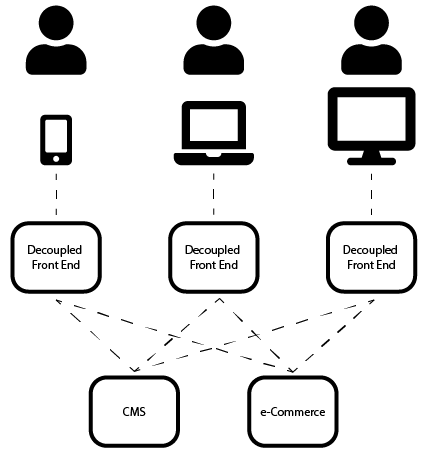
A Headless architecture is a decoupled architecture in which the front-end UI layer is completely separated from the data presentation (CMS) layer. The other way around: The CMS layer isn’t bothered with all the different front-end types, and the continuous changes to them. This has two major advantages:
- The CMS and the underlying back-end only need to be changed if there is a need from a business drive perspective such as a different type of web store, different marketing strategy or a different way of product presentation.
- A back-end developer doesn’t need to have any knowledge of UI development and the front-end developer can fully concentrate on the user experience.
Headless architecture
The headless decoupled architecture is realized by means of an API (Application Programming Interface) that is offered by the CMS layer to the UI layer. The API is an interface that determines how the UI layer can extract information from the CMS layer, after which the UI layer determines how it presents this information to the end user.
We can even go one step further: It is quite possible to have multiple systems in the back-end that all offer their API to the front-end UI layer. So you can have, for example, a system that is good in Content Management, such as WordPress, next to Magento, which is market leader in webshop functionality.Advantages
It should be clear that this kind of architecture has great advantages. The CMS layer no longer has to deal with every change in the different front-end channels. No more worries about new Android versions, or the release of the latest Smart Watch. And, for example, as the owner of a webshop, you create optimal functionality and flexibility through decoupling, because you can select the most suitable platform/framework for each function. Also the exchange of components is easier. Suppose that a webshop owner already has a WordPress webshop, but is not satisfied with the e-commerce functionality within that platform. He can then keep the WordPress platform as a content management system and migrate to Magento for the e-commerce webshop functionality.
Progressive web apps
Since the back-end has now become transparent, the front-end developers no longer have to take a standard into account that is enforced by the specific back-end. This means that there is currently a lot of innovation and new solutions that will give the user experience a huge boost. One of those new innovations are Progressive Web Applications, developed by Google. Where we previously could choose between a mobile website and a native app (whether or not cross-platform developed), there is now the PWA that behaves as a native app but is built in a JavaScript framework and is accessible through a website. The PWA is much lighter than a native app, nevertheless, it behaves in the same way. The PWA is secure (standard https) and can even be used off-line. The PWA is progressive (and therefore very fast) because it is "lazy loading" while the user navigates.
The PWA is already frequently used for mobile webshops. It offers an unparalleled fast interface for visitors, regardless of product numbers (think of millions). As a web shop owner, you no longer have to deal with app stores and you don’t have to develop another app for every front-end platform/device. The user can add the "app" to his home screen and because of its properties, it works in full screen mode on a mobile device. The app detects when the user is offline, informs him and presents the already searched part of the webshop.
Headless Magento
Magento puts heavy bets on a headless architecture in combination with PWA’s. They are convinced that this is the future of e-commerce.
In the early days of e-Commerce, the webshops only had to take a desktop or laptop front-end into account. This allowed a fairly static full-stack (front-to-back) to be used. But as technology evolved and mobile traffic and the variety of devices increased, a faster and more flexible development environment was needed, where components could be developed and exchanged independently.
Magento also wants to make it easier for its customers to expand, add, or change e-commerce functionality. Traditionally, a customer had to rebuild his entire web environment if he wanted to implement a new solution. This usually resulted in a very expensive and long-term migration process. Nowadays it is easier because an e-commerce module can be added to an existing environment while it creates interfaces (by means of API’s) with the existing front-end and/or data presentation layer.
For this, Magento currently offers Magento Commerce 2, which has a very wide range of API’s. They are also working on Magento PWA Studio for developers, to enable them to develop light and super-fast PWAs that can be used on top of the Magento webshop.
Another independent open source PWA is VueStoreFront that uses Vue.js, Node.js, MongoDB and Elastic Search. VueStoreFront can be used in combination with any e-commerce solution by means of the included APIs. For Magento however, an API adapter is already available.
Conclusion
Headless architecture, in combination with Progressive Web Applications, is here to stay and delivers an unrivalled user experience. In addition, it offers many opportunities for webshops to deal with changes faster, more flexible and less expensive. It is much easier to implement independent changes in specific components without affecting the entire environment. This makes you less dependent on one supplier and/or one platform, which ultimately benefits the quality and price.

React Native vs other cross-platform frameworks - which one to use in 2018
Even though the traditional approach provides unparalleled code consistency, it is costly and usually very slow. Cross-platform frameworks, on the other hand, allow the developers to write a single piece of code that can be applied to multiple platforms.
React Native is among the most popular cross-platform frameworks for the options to write in Java languages, Swift, or Objective-C. This write-up will take a closer look at React Native and a few other cross-platform frameworks to help you select the best one.
What makes react Native Popular
To begin with, React Native is an open source framework that follows web development principles and applies them to mobile development. The framework uses React.JS and JavaScript to deliver close-to-native mobile development, as opposed to hybrid or HTML5 apps.
Let’s have a closer look at some of the benefits and downsides of React Native.
- React Native benefits
With React Native and some other open source frameworks, a developer can add new features and fix bugs on the fly. Besides the open source flexibility, this cross-platform framework can cut the coding time in half.
There is no need to use two different languages or develop two different applications. You write in one code for both Android and iOS. Consequently, there is only one app to test and update, an invaluable productivity booster.
In addition, React Native should provide an easier transition for web developers who are new to mobile app development. This cross-platform framework incorporates familiar JavaScript principles and concepts so there is no need to learn a new set of complex rules.
You can simply follow the basic JavaScript elements and gradually develop your skill from there. What’s more, mastering React Native should be easy because the framework is quite straightforward.
- React Native downsides
If you encounter an unexpected structural issue, resolving of it might be problematic since React Native has a set number of third-party libraries. And there is also the question of Android and iOS platform design.
Both platforms look different and follow specific guidelines that can affect the placement of graphical elements. If graphical elements appear misplaced on either mobile platform, you will have to write additional code that adheres to the design guidelines.
Besides, there is no support for all of the native APIs, though this problem can be solved with Native Modules. However, you need to know the language in question when using Native Modules, which in a way defies the purpose of React Native.
Other cross-platform frameworks
Cross-platform frameworks like Flutter, Xamarin, and Ionic have become reputable React Native rivals for various reasons to be outlined below.
- Flutter
Unlike React Native, Flutter adopts Dart programming language and has well-structured documentation. Its user interface utilizes proprietary widgets as opposed to native components. Customizing Flutter UI components might be easier but there is a lack of elements in the Cupertino library for iOS development.
However, in terms of app performance and configuration Flutter outperforms React Native. With Flutter, you don’t need to use JavaScript bridge to communicate with native components and it supports 60fps animations. Flutter is also easier to install and automatically checks for system problems.
At the moment, React Native still has a larger community, more supported IDEs, and greater industry adoption.
- Xamarin
As opposed to React Native and Flutter, Xamarin is based on the .NET framework. It uses C# programing language which is mature and strong enough to prevent any unexpected situations. You can utilize .NET framework features like LINQ, Asynk, and Lambdas. In addition, Xamarin is compiled natively.
For these reasons, a lot of developers opt for Xamarin to engineer apps that look and feel native and perform accordingly. But the thing that makes Xamarin stand out compared to React Native is the use of the latest APIs.
This cross-platform framework can use all of the latest native APIs to exploit Xamarin platform capabilities like Android Multi-Window and iOS ARKit. This makes Xamarin apps stand up well against natively developed Android and iOS apps.
In terms of UI design, Xamarin gives you the option to create a layer of UI code for a specific platform. This means that the apps will look, feel, and perform natively on any given platform.
- Ionic
The main Ionic drawback compared to React Native or Xamarin is that it’s nowhere near as native. This lack of native-like performance comes from the fact that the framework doesn’t use native components and renders mobile apps via web technologies.
But it’s not all bad news for Ionic. You can test Ionic apps very quickly and the framework comes with a lot of ready-made components that can speed up development.
Conclusion
The choice of a cross-platform framework boils down to your needs or the needs of your client. Ionic can be a quick and easy solution for less demanding apps. Flutter performs really well but it lacks the support and practicality of React Native and Xamarin.
Thus, it might be best to go with either Xamarin or React Native for their flexibility and better native-like integration.

Interactivated customer "DisQounts" awarded as the fastest growing e-commerce company in the Netherlands

The basis for a good performing e-commerce company, is, of course, the online web shops. DisQounts is the owner of www.24dealstore.nl and many international variations. These web shops have been developed and are actively supported by Interactivated. Typical is the way, in which customers can pay directly from the product page. This optimizes the shop experience of the customer. This is important, at a time when customers want to be smoothly guided through the purchasing process in a very short time.
Interactivated actively supports DisQounts in further development, technical support, and maintenance of the web shops. The web shops are secure, fast and professionally hosted. Furthermore, they can, at any time, easily handle peaks of tens of thousands of visitors who visit the sites during promotional campaigns. Together with the unparalleled drive, smart marketing and management of Bas Urlings, the owner of DisQounts, this has led to the award-winning success. The last few years, because of his big success, Bas also started training other business owners.
With this beautiful company, Bas has found his right work-life balance. With his wife and children (1 and 3 years old) he travels around the world, skiing or on a towel in a tropical paradise. This is in stark contrast to the 21-year-old Bas, who started his current business struggling at his kitchen table. A company that now operates internationally with various web shops and a wide range of products. Bas now tries to limit working to 4 hours a week while his company just keeps on going. With this, he follows the philosophy from the book "The 4-Hour Workweek" by Timothy Ferriss. He believes that this success is achievable for everyone, and therefore also helps business owners with his vision and personal guidance.
Bas is the driving force behind the company. He generates the conditions under which the company can operate, motivates its staff and encourages them to pursue their dreams. In this way, they remain satisfied and committed to his business. With this, he simultaneously creates the conditions to organize his own time, to live healthy, to be free and to get satisfaction from his life.
Read more about Bas on his Facebook page and in various interviews where he talks about his success and his view on (business) life.
Facebook: https://www.facebook.com/bas.urlings Twinkel Magazine: https://twinklemagazine.nl/2018/08/crossbordertop30-2018/index.xml Algemeen Dagblad: https://www.ad.nl/ad-werkt/in-deze-wereld-draait-het-om-geld-verdienen-je-kunt-het-niet-iedereen-naar-de-zin-te-maken~aae2a451/

React vs. Angular vs. Vue
Many don’t hardcode these scripts themselves. Instead, they rely on libraries of scripts that provide them with a base to work from. Furthermore, these libraries allow for easier integration of JavaScript with other popular web languages, such as PHP and CSS.
As JavaScript’s popularity grew, so too did the number of libraries available to users. In this article, we examine three of these libraries to discover the best option for web developers.
React pros and cons
React is a popular JavaScript library that sees plenty of use when designing large web applications. It is particularly efficient when used for applications with changeable data.
One of the main benefits of this framework is the easy learning curve. Its syntaxes are a lot easier to understand due to their simplicity. A good command of HTML is generally enough to master React, so there’s no need to become an expert in TypeScript.
The framework is also quite flexible and very responsive. It can work at a very high load with ease when combined with ES6/7, which is another scripting language. Another interesting feature is the way data binding works. In React, the data flow from the child elements doesn’t affect the parent data.
This also makes React a light framework which allows user side data to be represented on the server side at the same time.
Last but not least, this framework is open source and gets plenty of updates on a regular basis from developers around the world.
But, there are some minor drawbacks when it comes to React. Due to its open-source nature, there aren’t any official documents to browse through. Contributions are made to the framework in a way that is not systematic at all as they’re generally made by individual developers.
Angular pros and cons
Angular has been around since 2009 and it has maintained a pretty sizeable market share. It is mostly used for creating highly interactive web apps.
If you’re going for Angular, then Angular 5 is the framework of choice. Its new and improved HttpClient launcher and enhanced RXJS feature allow Angular to have a faster compilation rate, sometimes less than 3 seconds.
The framework comes with detailed documentation and plenty of resources. For an individual developer this is almost like a gold mine of information. It also means that you don’t have to waste time on researching how to use the basic scripts that the library contains.
In Angular, data binding is a two-way process. Because of this, you’re able to enable singular behavior for your apps which should minimize the number of possible errors.
It’s also an MVVM framework which, needless to say, gives it a considerable advantage over its competitors when it comes to combining efforts from multiple developers on the same app.
Although Angular doesn’t have many integration issues to speak of, migrating from an older model to a new one may cause some issues, depending on the complexity of the application.
The learning curve is also quite high even with the many resources available. This is because the syntax is rather complex. Even with Angular 5 using TypeScript 2.4 these days, it will take some getting used to.
Vue pros and cons
Vue is a framework designed for complicated single page applications and user interfaces with high adaptability.
Its architecture is similar to React and Angular, which should allow for a quick switch over between other frameworks and Vue. Perhaps even more similar to Angular than some people give it credit for, Vue can easily be used to optimize HTML blocks with multiple components.
In terms of integration, Vue exceeds its initial promises. Although designed mostly for single page applications, it does seem to handle more complex web interfaces too. This is largely because small interactive elements are easy to integrate into an existing infrastructure without negatively impacting the entire system.
If you’re interested in developing large reusable templates, Vue is a solid choice. These are easily designed without having to allocate extra time. Why? – Once again, it’s because of Vue’s simple structure.
In terms of size, Vue is as light as they come. Occupying around 20KB of data, it manages to maintain speed and flexibility in a way that rivals its top competitors.
Is all of this enough to give it a clear edge? – It really depends on what you’re looking to achieve. Keep in mind that Vue has a tiny market share. This means that it comes with a higher learning curve due to the lack of available resources.
Some stages of development are even harder since not all the documentations have yet been translated into English. This may also cause some issues with troubleshooting, especially when integrating Vue in large projects and complex applications.
Opportunities
One quick look at any large job site and you’ll be able to see how the workload is spread among these three frameworks. React dominates the job market even in 2018. Angular has a decent chunk of the market share, but it’s still probably only 1/3 of React’s.
Vue is at the bottom of the totem pole. Despite the framework’s obvious benefits, it’s not yet mature enough to demand more attention.
Final word
The choice between these three libraries depends on what you’re looking for. Vue offers a simple structure that initially makes it attractive to novices. However, the comparative lack of resources could create a larger learning curve than you expected. You may also experience troubleshooting issues due to translation issues.
Angular offers a larger market share and one of the fastest compilers on the market. It’s also one of the most resource-rich JavaScript libraries, which makes navigating its features much easier. However, its complex syntax could create a roadblock for some users.
That leaves React as the top choice of the three. The most established of the libraries, it boasts a much large market share. It also makes use of simple syntax, which makes it user-friendly even if you might struggle to find documentation.
Finally, it’s regularly updated due to its open-source nature. As a result, you can rely on it to keep pace with other web technologies as they evolve.

Magento 101
If you’re planning to launch an online store but have no experience with eCommerce, Magento might be just what you’re looking for. In this article, you’ll find the answers to some of the most common questions about the platform, its cost, and the services it offers.
What exactly is Magento?
Magento is an open-source content management system (CMS) written in PHP. In a way, it is very similar to WordPress. For one, both allow you to build websites, as well as to customize their appearance and functionality. They both have an intuitive user interface that allows you to easily manage your online content. Finally, both WordPress and Magento have very active online support communities.
The main difference between the two platforms is their primary purpose. Whereas WordPress is designed for blogs and websites, Magento is intended specifically for eCommerce. With Magento, you can create detailed product pages, build and manage product and user databases with extensive metadata, conduct online financial transactions, and promote your online store.
Sure, you can use plugins to upgrade your WordPress template to a fully functional eCommerce site, but you’d still be missing several key features that Magento offers. Furthermore, those third-party apps are nowhere near as secure as Magento. They thus might not be a good idea, seeing as you’ll be handling a lot of your clients’ sensitive personal information.
Ultimately, if your goal is to sell products online on your own terms, Magento is the platform for you.
What can you sell on Magento?
No matter what type of products you want to sell, you can do so through your Magento online store. Whether you’re selling organic fertilizers, artisan candles, or homemade cookies, you can easily add them to your store’s catalog. You can also sell digital goods like software, gift cards, and web magazines. As long as your store and products comply with Magento’s Terms of Service and/or Enterprise Edition Agreement, you should have no problem selling pretty much anything.
Keep in mind, however, that you must also adhere to local laws and regulations that define what you can and cannot sell online. For example, every state has different regulations regarding online firearm sales, so you must look at them closely before offering your products in individual states. Different rules also apply to online sales of alcohol, cutlery, and automotive parts. Similarly, the UK law forbids the sale of Blu-rays and DVDs rated R18 online or offline outside of licensed stores.
The bottom line is this: before you start selling products to customers in a certain area, you must make sure that said products are in compliance with all local laws and regulations. Otherwise, you may be permanently banned from selling your products there. What’s more, Magento could remove your ability to process financial transactions online, rendering you unable to monetize your products and services.
Which version of Magento should you use?
The summer of 2015 marked the official launch of Magento 2.0, a brand new version of the platform that offers many useful eCommerce and marketing features not available in the previous versions. Merchants who had previously built their web stores using Magento 1.x could either continue to run their stores with outdated software or upgrade to the new version, which would not only cost them money but also time and effort to migrate all their products, catalogs, and metadata to Magento 2.0.
If you’re a Magento newbie or at least haven’t used this eCommerce platform on your current website, you should definitely opt for Magento 2.0 – not only for the features it offers but because everyone will have to migrate sooner or later. For the time being, Magento will continue to offer online support to its 1.x users, but all feature and security updates will be exclusive to Magento 2.0.
Which eCommerce features does Magento offer?
Magento offers hundreds of features all online stores could benefit from. Rather than listing each individual feature, they can be organized into ten key categories:
- Product data management – Manage all the products in your store’s catalog, either individually or in bulk.
- Website management – Build and maintain a fully functional site with a dedicated web store.
- Product organization – Organize your products by type, size, price, or some other key feature to allow users to browse your store more easily.
- Search engine optimization – Optimize your product pages and descriptions with keywords and metadata.
- Online marketing tools – Market your store, run promotions, and use your pages to convert more leads.
- Processing and fulfillment tools – Use Magneto Order Management (OMS) to fulfill and manage orders from any computer or mobile device.
- Shipping tools – With Magneto Shipping, you can also automate the shipping process by working with a network of carriers worldwide.
- mCommerce tools – Your Magento store is fully optimized for mobile phones and mCommerce.
- Customer database – Allow customers to register their profiles, rate and review your products, and sign up for your newsletter.
- Advanced reporting – Access detailed reports on your total revenue, orders, shipments, and tax information. Track product statistics in real time to learn what your bestsellers are.
How much does Magento cost?
If you opt for the Community version, you can download the latest release from the Magento website and install it on your server completely free of charge. Obviously, you will have to pay for the hosting and domain out of your own pocket, but you won’t have to pay to use the Magento eCommerce software. The only downside is that you don’t get access to advanced features. While this is good for developers and tech-savvy merchants, businesses may benefit more from one of Magento’s paid tiers.
You can choose between Magento Go and Magento Enterprise. The former allows you to host your online store on Magento’s servers. You will have access to all the features, but you won’t be able to access the code. This is ideal for small and medium businesses that want to save on costs related to hosting a big online store with high amounts of traffic. Plans start at $15 a month and your total cost will depend on the size and server requirements of your store and the level of tech support you need.
Enterprise gives you access to all Magento features and allows you to license the code and use it on your own website. This is intended for large businesses and brands, so it’s no surprise that it costs considerably more than the Go tier. In this case, the price will vary based on your store’s annual gross revenue. Whether you’re making money or not, you will have to pay $22,000 per year for Magento Enterprise. The more your store earns, the higher the cost of Magento Enterprise will be.
For example, if you’re earning anywhere between $1 and $5 million, expect to pay about $32,000 per year. You will pay close to $50,000 a year if your store makes between $5 and $10 million, whereas anything between $10 and $25 million will increase your cost to $75,000.
The final word
Known for its flexibility and ease of use, Magento is one of the most popular eCommerce platforms in the world. Whether you’re selling a few signature products or thousands of products in different categories, Magento can help you take your business to the next level.
If you opt for the Community version of the software, you may need to work with an experienced developer to get everything going. However, as soon as you learn the ropes and make use of some of the available Magento store plugins, of which there are many, you’ll be able to sit back, relax, and watch your online business grow.

Choosing a host for your Magento web store
To guarantee the success of your Magento store, you need to find the right host for it. In some cases, this means that you will have to transfer the entire content of your website to a new hosting service.
In this article, we will look into the key things to consider when searching for an ideal hosting solution for your Magento store. We will also help you choose the type of hosting that is best suited for your needs.
Four things to look for in a Magento host
Before you settle on a host for your Magento store, you need to look into the services they offer to make sure they meet the following four requirements.
1. Compatibility
First, you need to check if the service your hosting provider offers meets the minimum requirements for installing and running a Magento store. This is particularly important if you’re using Magento 2.0 or higher as you need at least PHP 7.0 for everything to run smoothly and many hosts only offer PHP 5.x.
Magento also has very strict rules about PCI compliance, which is why you need to find a PCI-compliant hosting option. The Payment Card Industry (PCI) compliance is a protocol that ensures secure financial transactions and protects the safety of your buyers’ credit card data and personal information. If you fail to comply with Magento’s PCI requirements, they could remove your ability to process payments.
2. Security
If you’re one of many merchants who sell their products exclusively online, the livelihood of your business depends on your Magento store. To ensure the safety of your customers and their data, you need to protect your store from viruses, malware, and hackers. Although there are some steps you can take like using backup DNS services, most of it is the responsibility of your hosting provider.
Ideally, your provider needs to have a sturdy antivirus protection for the server where your store is hosted. They also have to have a hardware or software-based protection mechanism against distributed denial-of-service (DDoS) attacks. Finally, they should offer at least basic firewall features, as well as the ability to enable or disable certain PHP modules that are built into the Magento platform.
3. Speed
Slow loading times can be detrimental to the success of your Magento store. If pages on your store take forever to open, potential customers may turn to your competition for a faster, frustration-free shopping experience. This is why you need to make sure that your site is always working at optimal speed.
To ensure a fast server response rate and excellent loading times, you need to have a good server-side caching solution in place. Depending on the type of hosting you opt for, you may need to provide it yourself. However, if you opt for shared hosting, it is up to your provider to give you access to xCache, memCache, or some other PHP-accelerating caching system.
4. Tech Support
No matter how much time, effort, and money you invest in its security, your Magento store could sometimes go offline. It can be due to some mistake you made, but also because of some problems on your provider’s end. In any case, you will need to act very quickly because every minute your store is offline could mean a loss of sales, especially if it happens during particularly busy times of the year.
For this reason, you need to opt for a hosting service that offers excellent technical support. Sure, you can’t expect them to offer real-time support 24/7, but they should at least be able to respond to your emails within a few hours. Also, if your provider is asking you to pay extra for additional tech support features like live chat or phone support, you might want to consider it.
Finding the right type of hosting
Once you’ve found a host that meets all the requirements outlined above, you need to choose the right type of hosting for your needs. As a rule, most hosting providers offer the following three options.
1. Shared Hosting
With shared hosting, your web store is hosted on a physical server shared with several other websites. Most website owners opt for this option because they get a decent amount of storage space at a very affordable price. However, while it works well for WordPress or other CMS platforms, shared hosting might not be the best choice for hosting your Magento web store.
That’s because you only get a limited amount of resources, both in terms of physical storage and the server’s RAM capacity. Whereas WordPress websites don’t consume many resources, Magento stores often do. With increasing traffic and data storage requirements, your store may experience lagging and extended downtime. For this reason, it may be best to opt for some other type of hosting.
2. Virtual Private Server (VPS)
Although similar to shared hosting, virtual private servers (VPS) have one major advantage. Namely, even though you’re essentially sharing a server with others, you are not sharing actual physical resources with them. This means that you can easily expand your disk space, bandwidth, and memory depending on the size of your Magento store. That’s not the case with shared hosting, where servers are operating at maximum capacity and there’s no way to expand your resources beyond what’s already allocated to you.
Due to their adaptability, virtual private servers are the go-to option for most merchants running their own Magento stores. Also, while VPS hosting is slightly more expensive than the shared option, you will get all the perks of having your own dedicated server while paying considerably less.
3. Dedicated Server
You can also opt for a dedicated server, which is usually the most expensive of the three options. Dedicated hosting is intended for stores with large product libraries (anywhere from a few thousand to 500,000+ products). While it’s certainly preferable to shared hosting – after all, you get an entire server with unlimited resources – it may not be necessary if you’re running a medium-sized Magento store. If that’s the case, VPS hosting will be more than enough to meet your demand for resources.
The Takeaway
To give your Magento store a fair chance to succeed, you need to find a compatible hosting service that offers excellent speeds and state-of-the-art security features. Seeing as even the most secure websites aren’t always immune to hackers and DDoS attacks, reliable tech support is also a must.
Which type of hosting you choose should depend solely on the size of your Magento store and its product library. Shared hosting might be enough if you’re only selling a handful of signature products. For everything else, VPS hosting should do the trick. But if you’re running Magento 2.0 and have thousands of products in your database, you may want to consider getting a dedicated server.

Magento vs. PrestaShop: an overview
Is newer always better? Is a simple interface a key feature to running an ecommerce venture? The answer may surprise you.
In this article, we’ll take a close look at the main selling points of both platforms. By highlighting their highs and lows, you should have a better understanding of which platform is better suited for your particular setup.
Pricing
Pricing is a key element of any ecommerce platform. Magento is well known for its low subscription plans and free assistance. It is also known for having a wide range of free templates and plugins alongside the ones you have to pay for.
You can credit the Magento community for the tons of free ‘extras’ that you can use for your webstore.
Now let’s talk about PrestaShop. This software is free to download and free to use. There are no subscription plans that give you access to more themes or specific features.
However, PrestaShop does have some tricks up its sleeve. If you want support, you literally have to pay for it. The assistance is top-notch but can be a bit expensive for most site owners.
Granted, Magento doesn’t have a 24/7 hotline but at least you don’t have to choose between three payment plans to get the assistance you need. Another drawback is that none of the plans comes with a lifetime payment.
So, while PrestaShop may be free to use, it’s not as appealing as it sounds when you factor in paid plans for support and, wait for it – paid hosting. Yes, PrestaShop also forces you to use specific hosting services whereas Magento gives you total freedom to choose your favorite service.
Hosting
Setting aside the financial aspect of hosting, you should also know some other key differences between the two platforms. Magento obviously lets you choose whatever hosting service you want. You can go for a high-end provider with tight security or you can cut costs and take your business to a more affordable provider.
PrestaShop not only forces you into choosing their hosting partner, it also prevents you from choosing any other option. As it stands these days, you can’t launch your PrestaShop store without partnering up with one of their partners.
This lack of flexibility can be a major deal-breaker for a lot of site owners.
Functionality and integrated features
For a while, it seemed like the two were neck and neck in terms of features. PrestaShop puts a lot of emphasis on analytics and integrated features that help understand incoming traffic. This allows a website owner to modify the business strategy for maximizing profits.
It also does a great job of allowing shops to export product listings to huge marketplaces such as Amazon and eBay.
However, as extensive as PrestaShop’s list of features may seem, it’s like comparing a grocery list with an encyclopedia. The latter represents the vast array of integrated features that Magento offers to its users.
Here’s just a small taste of what Magento has and PrestaShop doesn’t:
- Drag and drop interface
- Campaign management
- API
- AWeber
- HubSpot marketing
- BankPayment
- Stripe
- Embedded ERP
- Advanced statistics
- Analytic graphs integration
- Private sales
- Reward system
- Wish lists
- Targeted promotions
Ease of use
Now, judging by the amount of features and integrations in the Magento platform, it’s safe to say that this is not the easiest one to use. You do need some assistance especially if you don’t have a tech or development background.
PrestaShop is a bit simplified in terms of interface and feature implementation. It may seem like the optimal choice for freelancers and small business owners. After all, when and if you need more data and more features you can always find ways to migrate to a new platform.
However, just because the platform comes with a minimal learning curve doesn’t necessarily translate to an edge over Magento. If you consider PrestaShop’s paid support plans, even with limited knowledge in development and shop cart integration, Magento seems like a better option.
With Magento, you can make use of tons of written guides and video guides on how to get started, perform maintenance, adapt to unforeseen scenarios, and so on. The beauty of it is that you can access those free resources as needed and at any given time.
What about SEO?
Everyone wants to know about SEO functionality and effectiveness. In this respect, PrestaShop offers automated URL rewriting, CMS pages, and automatic Meta tags and social Meta tags. Overall it does a surprisingly good job at keeping up with Magento.
The industry-leading Magento, on the other hand, does all that and more. Magento also offers image optimization, separate Meta tags for home pages or products, editing of robot.txt files, canonical tags, Yoast integration, and more.
At the end of the day, there might be one SEO aspect that gives a slight edge to PrestaShop. Magento’s pages can be slow to load at times given that the platform is front-end heavy. It may take serious customization to get everything working just right and perhaps that’s something that not everyone has the time or the skill to perform.
Final word
At first glance, PrestaShop’s main draw is the free-to-use aspect. However, the reality of it is that without investing in their hosting and templates, you can’t really do much. What’s even worse is when you have to pay large sums of money to get assistance from their support staff.
In contrast, Magento is not the cheapest alternative by any means. Some of their best themes and templates cost serious dough. Nevertheless, you get a lot more freedom when it comes to choosing what you want or don’t want to pay for.
Magento isn’t the industry’s leading platform for just a few reasons. It sits on its throne because it can be as complex or as simple as you need it to be. It’s an ecommerce platform that molds itself to the widest range of businesses.

Is BigCommerce a big threat to Magento?
In order to see how much of a threat BigCommerce is or how much of a threat it can become, it’s important to compare some key features of both.
This article will put Magento and BigCommerce head-to-head in a couple of key categories. For the purpose of not boring you, we’ve steered clear of backend potential and frontend features as those categories are in Magento’s favor for the time being.
A quick comparison
Pricing
The first major difference between BigCommerce and Magento is the pricing plan. BigCommerce has a couple of monthly payment plans in place. The more you pay the more features you get access to. Even the analytics and security features seem to get an upgrade with the more expensive the subscription.
In this regard, BigCommerce is not exactly a big threat but more like zero threat to Magento. The beauty of Magento’s open source solution makes it so anyone can use it at any time. The software can be downloaded for free and websites/ecommerce stores can be built in record time.
Yes, BigCommerce does offer some assistance and it gets better at the higher subscription level. However, because Magento is an open source platform, the community hub is huge. It’s just as easy to browse through guides or ask for help, and it doesn’t cost extra.
In fact, Magento doesn’t cost you anything. What does cost you is buying your own domain name and hosting. But, if you want to set up a store quickly and with minimal investment, Magento is still the reigning MVP.
Marketing
1. Social Media Integration BigCommerce is known for handling Facebook sales really well. The platform has a sweet SocialShop interface. What it lacks is Twitter and Pinterest support. You may have to turn to external apps do get those integrated.
In this regard, BigCommerce is no longer a threat to Magento. In terms of social media integration it has surpassed the open source platform. Magento doesn’t come with built-in social media support. You can still make use of third-party apps but it’s just not the same.
2. SEO Magento is as SEO-friendly as it gets. Besides the customizable URLs, the product Meta data is easy to set up and you benefit from a Google sitemap. You can also access Google content API to get a better sense of where you need to improve.
BigCommerce has pretty much the same SEO features. It also comes with robots.txt file alongside the sitemap. The URLs may be a bit more customizable but they don’t make as big of an impact as you might think.
In terms of SEO props, both platforms are neck and neck. Because of this, you could say that a user could easily go with BigCommerce in lieu of Magento.
3. Promotions Magento edges out BigCommerce with its built-in promotions system. It provides everything from free shipping and multi-tier pricing to upsells and product bundling.
BigCommerce has been a bit slow on the integrated promotions front. The platform is limited to gift wrapping and gift certificates mostly. And, it doesn’t look like BigCommerce is making big strides to improve on this.
Stats
Here are the stats that BigCommerce sees as relevant: store overview, order reports, traffic reports, abandoned cart info, and minor details on customer activities. For a small business that may be enough, but for a medium-sized online store or an enterprise venture, it’s not nearly enough.
Magento is king when it comes to providing detailed analytics and stats for the shop and the customers. One of the reasons why the store overview is superior on this platform is the introduction of advanced graphs. You won’t find this feature in BigCommerce.
Tax reports and sales reports can all be integrated with Google Analytics. Information on product reviews, product popularity, and projected trends is also available.
BigCommerce has a lot to improve upon in order to challenge Magento’s dominance in analytics.
Hosting services
This topic is a bit tricky to judge. BigCommerce does offer hosting but it’s not like it’s free. Sure it is included in the price of the monthly subscription but is it really that solid? The servers are SAS 70 Type II certified servers which should be good enough for most sites.
But, if you want something that’s guaranteed to be better, you don’t really have the option. But if you’re using Magento you have to find and pay for your own hosting, though it comes with a choice.
You can take your business to the cheapest servers on the market or pay for the most high-end services money can buy. You essentially get to design how tight you want your security to be. Also, you can guarantee that those servers can handle your traffic increases, should you hit it big.
Support
If there’s one thing truly lacking from Magento is 24/7 support. Yes, the community is immense and there are plenty of expert developers ready to assist, different time zones can cause issues. No one is getting paid for 24/7 assistance so you might have to be patient at times.
BigCommerce obviously has the edge here. Since this is a pay-to-use platform, their customers have access to a call center. Of course, if you’re an experienced developer you might not need to spend 2 hours on the phone.
For some users it’s enough to read through a couple of forum topics. Beginners or intermediate users may benefit more from BigCommerce’s support center.
Final verdict
Can BigCommerce become a legitimate threat to Magento in the future? – The answer is yes. Is BigCommerce a big threat to Magento now? – That answer would be no.
BigCommerce is impressive these days, especially considering the platform’s questionable start. However, it still lacks in certain key areas such as pricing, overall marketing, and most importantly analytics.
For most site owners, ecommerce is all about analytics, stats, and ways to predict sales, product popularity, etc. Because of this, and because of how cost-effective and easy it is to get rolling with a Magento-based online store, BigCommerce is not so much a threat but might cut into Magento’s market share down the road without significantly affecting its number of total users.


Our expert team is on standby - day or night - to talk timelines, budgets, and bring your idea from concept to launch - seamlessly. No stress, no delays.
Let's Figure This Out Together